Chaturbate OBS Setup: Broadcast Token & Settings
Stream to Chaturbate from OBS through Stream-Split, alongside your other cam sites. Chaturbate calls your stream key a "broadcast token": you copy it once, paste it into your Stream-Split dashboard, and point OBS at us.
Start free1. Copy your broadcast token
- Logged into your Chaturbate account, click the camera icon labelled Broadcast at the top right. It opens your My Broadcast page.
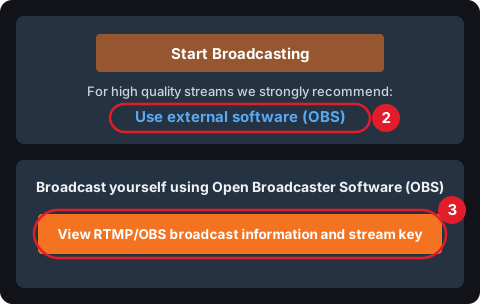
- Under the Start Broadcasting button (that one is for broadcasting from the browser), click Use external software (OBS).
- Click View RTMP/OBS broadcast information and stream key.
- Your token is in the box under Your broadcast token:. There's no Copy button: click into the box, select all of it and copy it.
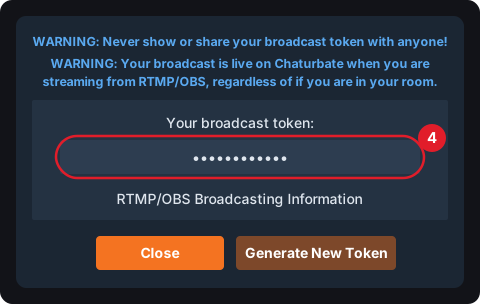
The popup also lists Chaturbate's RTMP URL, which you don't need with Stream-Split, and its settings, covered below. Close it when you have the token.
2. Add it to Stream-Split and connect OBS
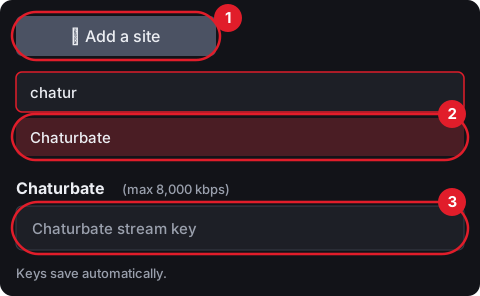
In Stream-Split: + Add a site (1), type "chatur" and choose Chaturbate (2), then paste the token into the Chaturbate stream key box (3). It saves on its own, and Chaturbate gets its own row. The token is the only thing Chaturbate needs.
Then connect OBS
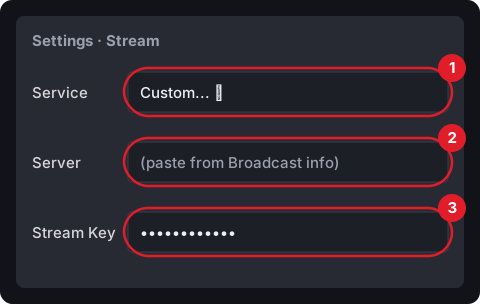
OBS doesn't get the Chaturbate token. In OBS, open Settings → Stream:
- Switch Service to Custom...
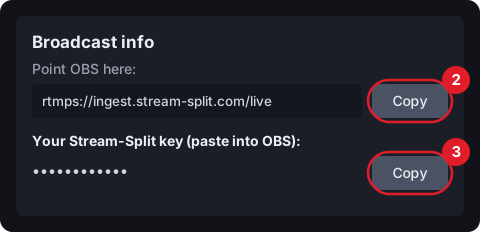
- In Server, paste the address from Broadcast info (the top Copy button in your dashboard).
- In Stream Key, paste your own Stream-Split key from just below it, and click OK.
Settings: Chaturbate takes anything from 240p up to 4K, but it has a minimum bitrate for each resolution and flags streams that fall below it: 5,000 kbps at 1080p, 3,000 at 720p (at 30 fps; more at 60, see below). Our standard settings sit exactly on those minimums, so don't go lower. Also don't stream a higher resolution than your camera gives you; Chaturbate asks you not to upscale. Everything else is in OBS settings for cam streaming and your dashboard's Set up OBS panel.
3. Going live: Chaturbate is live as soon as video arrives
Chaturbate warns in that same popup that your broadcast is live whenever a stream reaches it, whether or not you're in your room. There's no separate button to press on Chaturbate. So with Stream-Split, the Chaturbate row in your dashboard decides it:
- Live: you're on air on Chaturbate.
- Away: your room stays live and shows your away clip.
- Off: nothing goes to Chaturbate.
Running Chaturbate with another site? See Chaturbate and Stripchat together or Chaturbate and MyFreeCams together.
Your dashboard's When I start in OBS switch sets where every site starts when you click Start Streaming: Go live everywhere, or Keep all off until you choose.
Chaturbate questions
- Is the broadcast token the same as a stream key?
- Yes. Chaturbate calls it your broadcast token; in Stream-Split the box is labelled "Chaturbate stream key". Keep it private: Chaturbate's own warning is never to show or share it.
- I clicked Generate New Token. What now?
- Copy the new token, click ⚙ Edit on the Chaturbate row in your dashboard and paste it in. If you're live at the time, Stream-Split switches to it within a few seconds.
- Can I use 60 fps on Chaturbate?
- Yes. Chaturbate supports up to 60 fps (30 at 4K), and it's worth it if your camera really films at 60. At 60 fps it wants more bitrate than its tables show: send at least 7,500 kbps at 1080p, because 5,000 (its 30 fps figure) gets flagged as too low. One stream goes to all your sites, though, and Cam4, CamSoda and BongaCams publish 30 fps as their maximum, so keep 30 if you also stream to one of them.
- Can I stream to Chaturbate without Stream-Split?
- Yes. In OBS, Settings → Stream → Service, click Show All... and choose Chaturbate, then paste the token. That sends your stream to Chaturbate only.